Qwimo · Dolibarr module

Your GLS labels, straight from the shipment.

One button on the shipment card: the module sends the consignee and the parcels to your carrier, gets the 10 x 15 PDF labels back and stores them with the shipment documents. The tracking number lands on the card, with no retyping.

✓ Compatible with Dolibarr 18 → 23 ✓ GLS included ✓ €49 excl. VAT · one-off
The module

From shipment to labelled parcel, without leaving Dolibarr.

No more copying addresses into the carrier's portal: the consignee is read from Dolibarr, and the label comes back into Dolibarr.

One click from the shipment

A Carrier tab and a button on the shipment card. You enter the number of parcels and their weight; the consignee comes from the delivery contact, the order or the third party.

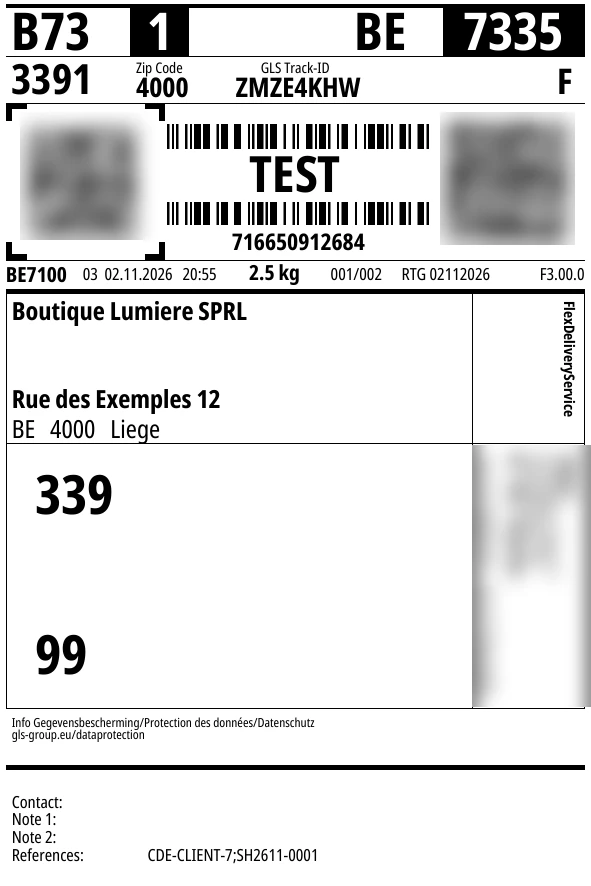
10 x 15 labels, ready to print

One page per parcel, merged into a single PDF and stored with the shipment documents. The carrier's real format, for thermal or laser printers.

Tracking on the card

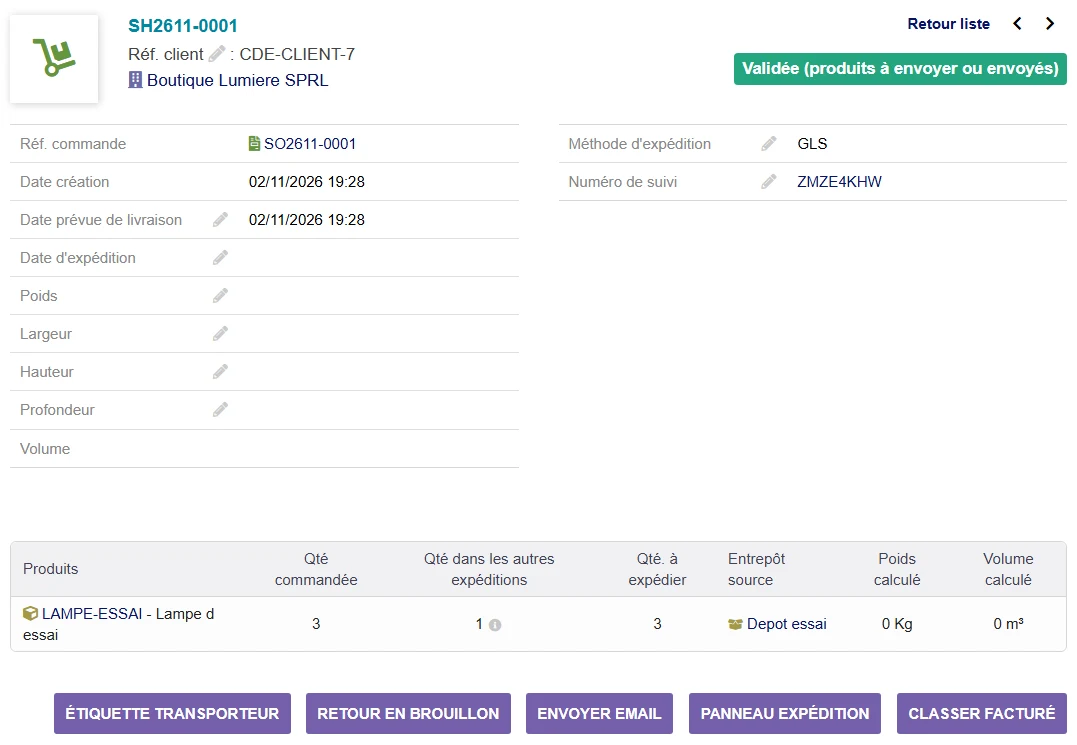
The parcel number becomes the shipment's tracking number, with the shipping method: Dolibarr turns it into a tracking link. Optional e-mail notification of the consignee.

Cancellation and end of day

Cancel a label from Dolibarr as long as the parcel has not been picked up. The end of day, required by GLS for tracking, runs on its own every day.

No duplicates, no surprises

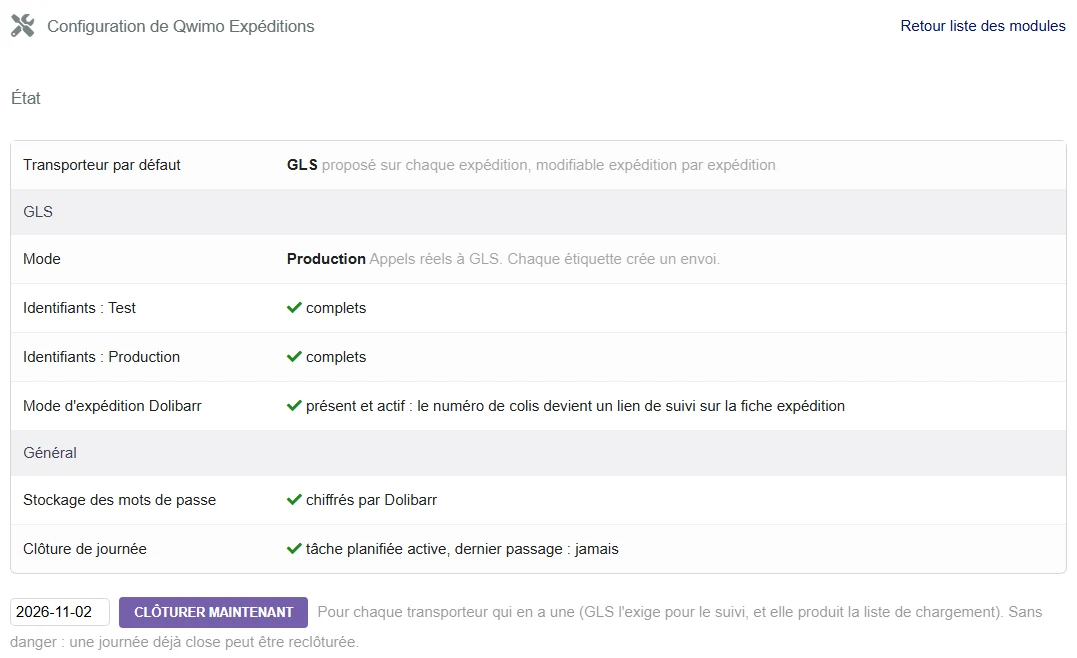
Only one active label per shipment, guaranteed by the database. Simulation mode to set up the printer, test mode before production.

Several carriers

A default carrier, changeable on every shipment. GLS is included; your carrier can be added on request.

In pictures

The module, screen by screen.

Real screenshots of Dolibarr (French interface), with fictitious data. Click to enlarge (zoom & keyboard slideshow).
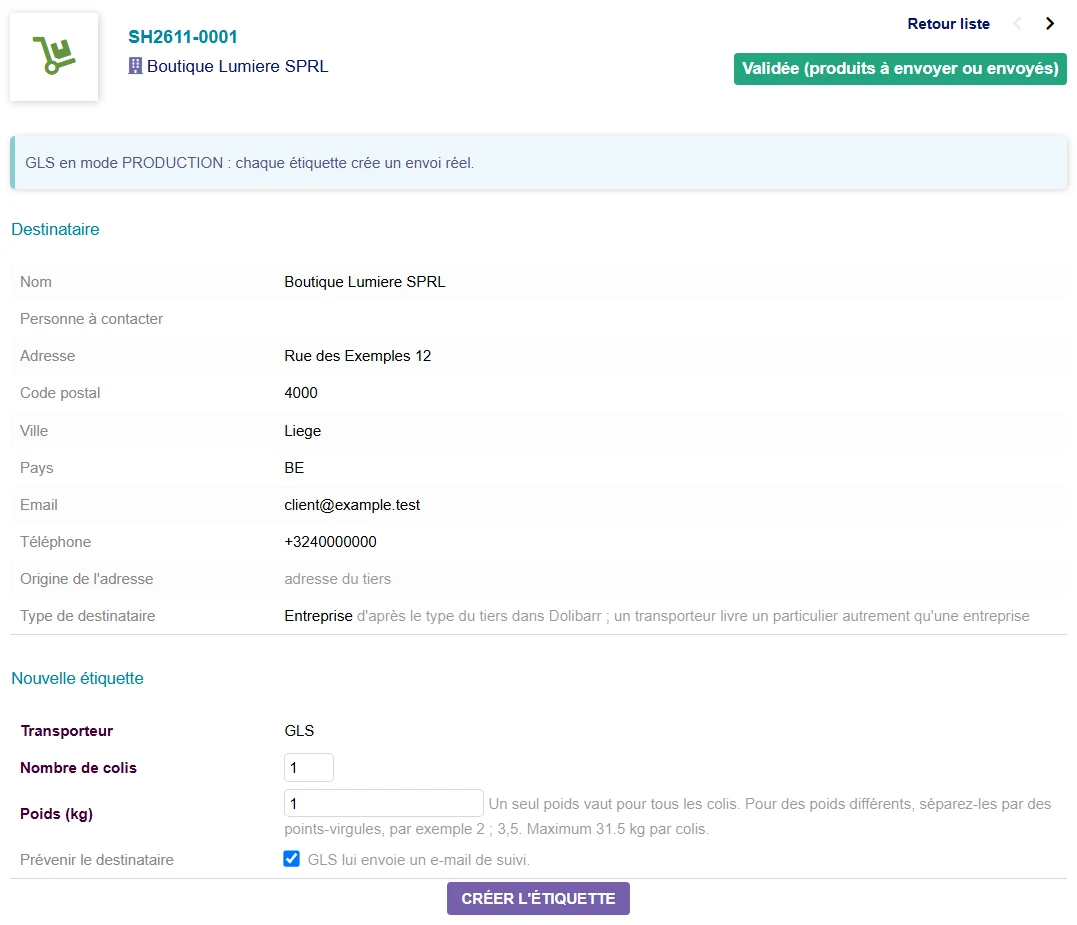
The Carrier tab: consignee, parcels and weight
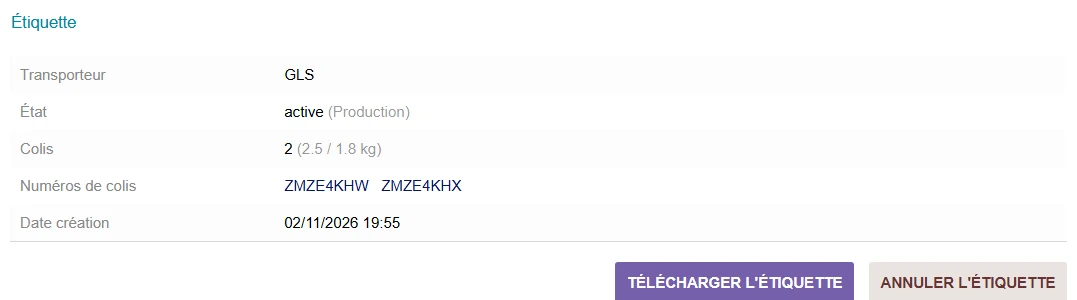
Label created: parcel numbers, download, cancellation
GLS method and tracking number on the shipment card
GLS label in 10 x 15 format (GLS test environment)
Setup: default carrier, modes, encryption status
Carriers

GLS today, yours on request.

The module is built for several carriers: each one has its own credentials, mode and label format, and you choose on every shipment.

GLS

Belgium and international, through GLS's ShipIT API. 10 x 15 labels, tracking, FlexDeliveryService notification, end of day. Included.

Your carrier

Another carrier in the same tab, with the same button: we add it on request, on quotation, depending on the API it provides.

Request a carrier →

Pricing

A simple price, no subscription.

One-off purchase. The module is free software (GPL) and remains usable for life.

The module

Qwimo Shipping

€49 excl. VAT
one-off
  • Full module with GLS
  • Simulation, test and production modes
  • Default carrier, changeable on every shipment
  • Immediate delivery by e-mail, 1-year update licence included
Order · €49

📘 Installation and user guide (FR · NL · EN) — download the PDF.

Additional carrier

On quotation
depending on the carrier
  • Integration of your carrier's API
  • Same tab, same button, same tracking
  • Price given before any development
Request a quotation

Secure payment by Stripe · Sold by GT Consult (BE) · Prices excl. VAT, VAT calculated at checkout.

FAQ

Frequently asked questions.

What does this module do?
It creates your carrier's labels from the Dolibarr shipment card: it sends the consignee and the parcels, gets the PDF labels back, writes the tracking number on the shipment and lets you cancel a label.
Which carriers are supported?
GLS, included in the module. Other carriers can be added on request, on quotation: the price depends on the API the carrier provides.
What do I need on the GLS side?
A GLS contract with access to the ShipIT API. GLS gives you your credentials (user, password, Contact ID); you enter them in the module setup and check in test mode before switching to production.
Which Dolibarr versions are supported?
Dolibarr 18 to 23, PHP 7.4 to 8.4. It installs in custom/ and does not modify the Dolibarr core.
What label format?
A PDF in the real GLS label format, 100 x 150 mm (10 x 15), one page per parcel. It prints on a thermal label printer or a laser printer.
Are my credentials protected?
The password is encrypted by Dolibarr and never displayed again. The setup page reads the database to tell you whether it really is encrypted.
Is there a user guide?
Yes. An illustrated 27-page guide, in French, Dutch and English, covers installation, configuration, day-to-day use and troubleshooting. It is freely downloadable, before and after purchase: open the guide (PDF).
Custom

Need a module that doesn't exist yet?

We build your custom Dolibarr module: automation, API integration, business connector, eco-contribution scheme… Describe your need and we'll come back with a clear proposal.

Discuss your project →

A question? Email us at — or via the support page.

Tester la démo