
Qwimo — Dolibarr module

Your Falco & Horus payments, synced into Dolibarr.

The module queries the Horus API (OAuth2), retrieves the payment status of your sales invoices — paid, partial, unpaid — with the real amount and date, matches them to your Dolibarr invoices, and posts the payments after your validation. No more double entry.

✓ Compatible with Dolibarr 16 → 23 Idempotent posting (no duplicates) Real amount + date
The module

Your accounting tracks payments. Now Dolibarr does too.

Your invoices go out through Falco / Horus, where your accountant tracks the settlements. This module brings that information back into Dolibarr — automatically matched, without re-typing a single amount.

Reads straight from Horus

Through the Horus API (OAuth2), the module reads for each sales invoice the status (paid / partial / unpaid), the last payment date and the amount paid — partial payments included.

Matching & validation

Each payment is matched to the Dolibarr invoice (number or structured communication). A validation screen shows the amount to post: you tick, you confirm, nothing is written without your approval.

Idempotent, no duplicates

The posted amount = paid in Horus − already paid in Dolibarr, capped at the balance due. The Horus reference is kept on the invoice. Run it as often as you like, never duplicating a payment.

The reconciliation screen

You stay in control of every entry.

A clear table: invoice, customer, paid in Horus, already paid in Dolibarr, and the exact amount to post.

Reconciliation screen — Horus payment detected, €1,000 to record
The payment recorded in Horus is detected: €1,000.00 to record on the invoice, with the real date.
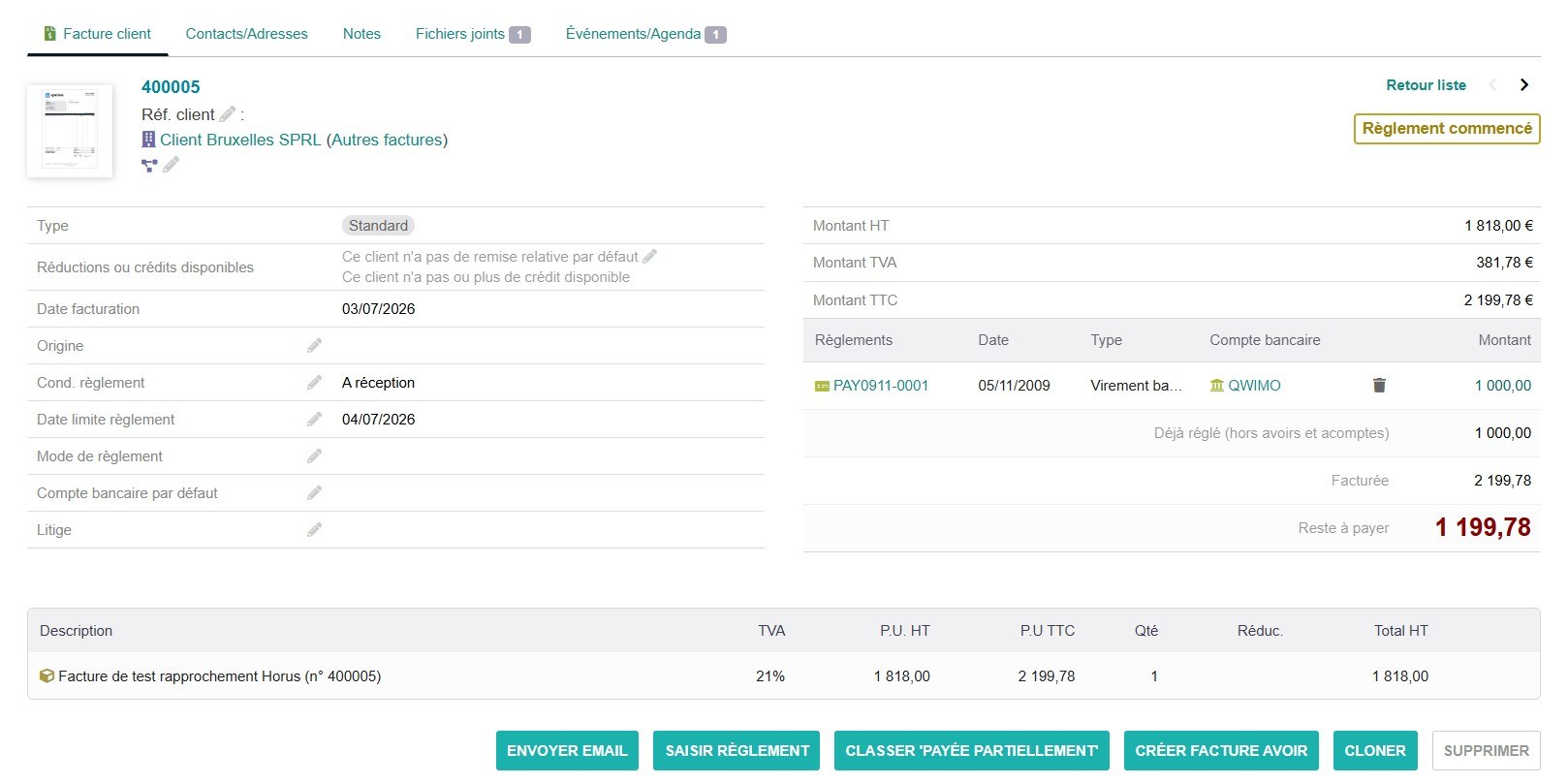
Dolibarr invoice with the imported payment (real amount and date)
After your validation, the payment is written to the Dolibarr invoice — real amount and real date.
Reconciliation screen — invoice up to date, no duplicates
Run the sync as often as you like: the invoice shows “up to date” — never a duplicate (idempotent).

Real screenshots of the module, connected to the Horus demo folder.

Pricing

One simple plan — all included.

The module is free (GPL) and works for life; the licence, included with your purchase, gives you 1 year of new versions. Renewable afterwards, if you wish.

The module

Falco & Horus payments

€329 excl. VAT
one-off · 1 year of updates included
  • Full module (Horus sync + reconciliation)
  • Optional automatic daily synchronisation
  • Works without activation (GPL)
  • 1-year update licence included
  • Instant delivery by email + PDF guide
Buy — €329

Renewal

€99 excl. VAT / year
extends the update licence
  • +1 year of new versions
  • Compatibility with future Dolibarr versions
  • For existing customers (licence key required)
Renew — €99

Secure payment by Stripe · Sold by GT Consult (BE) · Prices excl. VAT, VAT calculated at checkout.

FAQ

Frequently asked questions.

What does this module do?
It retrieves the payment status of your sales invoices from Falco / Horus (paid, partially paid, unpaid) with the real date and amount, matches them to your Dolibarr invoices, and posts the payments after your validation. No more double entry.
Why the Horus API and not Falco?
Falco and Horus belong to the same vendor. The Falco API handles Peppol sending but not payment tracking; it is the Horus API that exposes the status, the last payment date and the amount settled (partial payments included). The module posts those real values into Dolibarr.
Can the module run on its own, every day?
Yes. A Dolibarr scheduled job (created when the module is enabled) can record detected payments every day — provided you enable the “Daily automatic recording” option in the setup (off by default). Writing stays idempotent (never a duplicate) and the reconciliation screen remains available at any time.
Can the module create duplicate payments?
No. It is idempotent: it only posts the difference (paid in Horus minus already paid in Dolibarr) and keeps the Horus reference on the invoice. You can re-run it without ever duplicating a payment.
Which Dolibarr versions are supported?
Dolibarr 16 to 23. It installs in custom/ and does not modify the core (a traceability extrafield + a reconciliation screen in the Bank menu).
What Horus access is required?
The module connects to the client's Horus folder via OAuth2 (the client authorises read access to their folder). A Falco Easy plan at minimum is required to complete the connection.
Custom

Need a module that doesn't exist yet?

We build your custom Dolibarr module: automation, API integration, business connector, eco-contribution scheme… Describe your need and we'll come back with a clear proposal.

Discuss your project →

A question? Email us at — or via the support page.

Tester la démo
